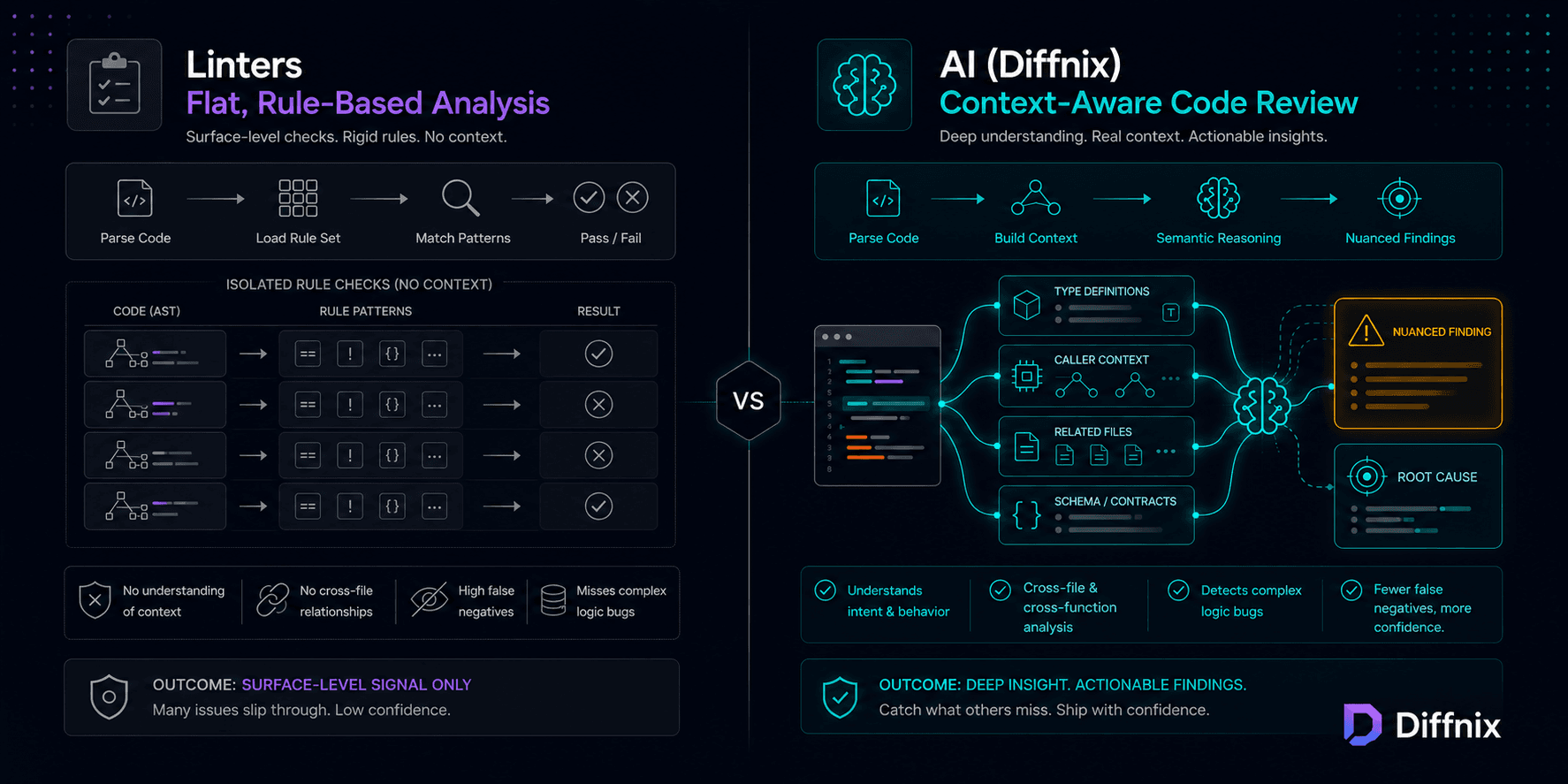
Linters vs AI Code Review: Why Passing Lint Does Not Mean Your Code Is Correct
For CTOs and tech leads evaluating their quality stack. This post explains what linters actually do at a structural level, why adding more lint rules does not solve the logic bug problem, and what semantic AI analysis provides that rule-based tools are architecturally unable to deliver.

Introduction
Your ESLint configuration is comprehensive. SonarQube runs on every PR. Your team treats lint failures as hard blockers. The lint score is green across every repository.
And you shipped a production bug last month that passed all of it.
This is not a calibration problem. It is not a coverage problem. It is a category problem. Linters and semantic AI analysis do not operate at different levels of the same type of tool. They operate on fundamentally different models of what code is and what code review means.
Understanding that distinction is what determines whether investing in more lint rules will help you, or whether you need a different category of analysis entirely. This post makes that distinction precise — technically, not as marketing copy.
What Linters Actually Do
When ESLint processes a JavaScript file, it does not read code the way a developer reads it. It builds an abstract syntax tree: a structured representation of the syntactic form of the code. Then it walks that tree, checking whether nodes match configured rules.
A null safety rule looks like this: "find any MemberExpression node where the object has not been null-checked in the preceding control flow." The rule fires when the syntactic pattern matches. It has no knowledge of what values the calling code actually passes to the function. It has no knowledge of what types the properties hold at runtime.
// ESLint null safety check: passes
function processPayment(user) {
    if (user !== null) {
        return charge(user.accountId);  // accountId itself not checked
    }
}

// ESLint null safety check: also passes
function processWebhookEvent(response) {
    if (response.statusCode == 200) {    // loose equality -- no eqeqeq warning
        return handleEvent(response.data) // data not validated
    }
}
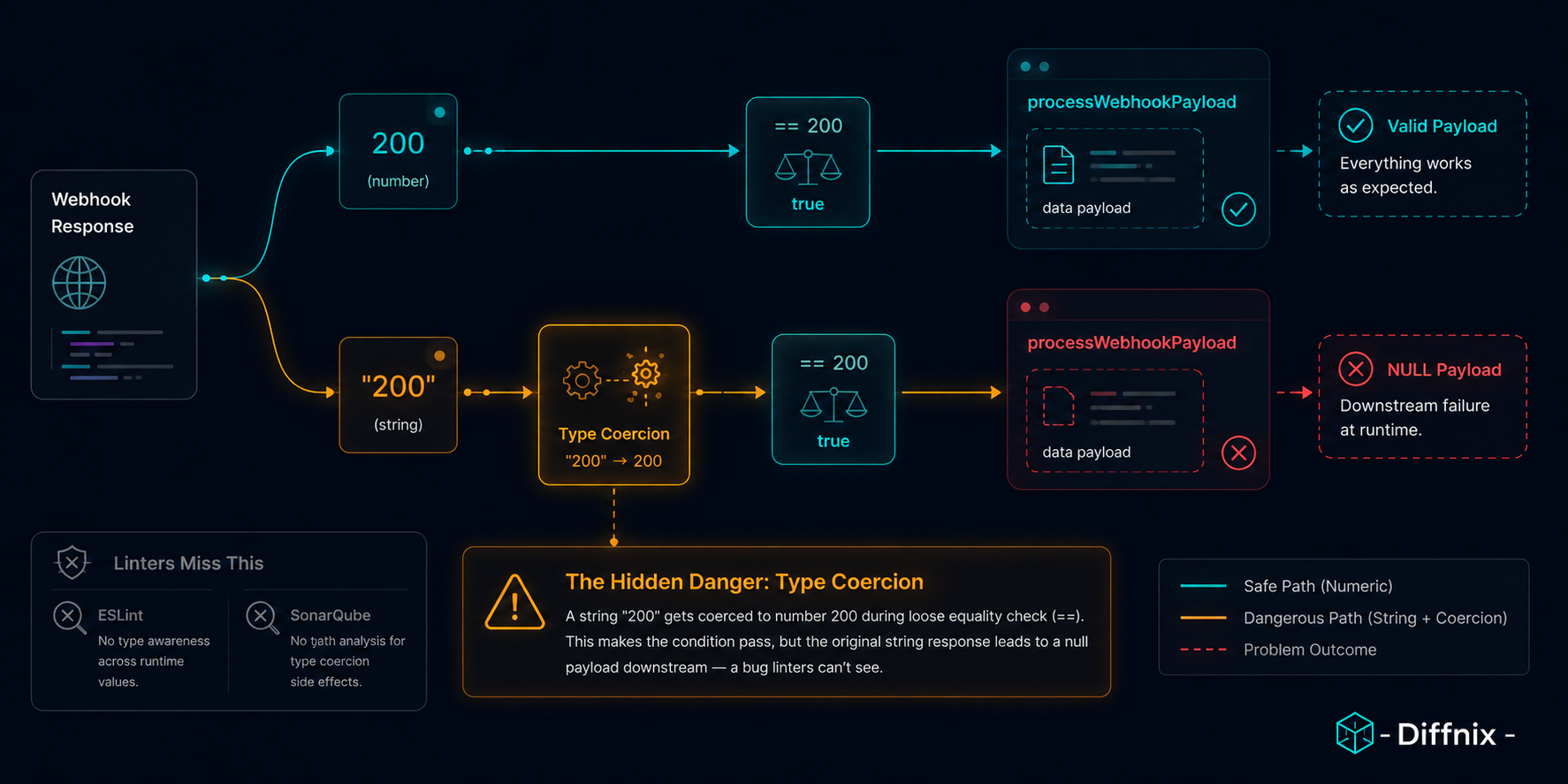
Both of these pass a comprehensive ESLint configuration. Both have correctness problems that require runtime context to identify. The null check in the first example does not cover the case where user.accountId is null. The loose equality in the second does not account for response.statusCode arriving as a string from a query-string-parsed webhook.
The linter checked whether patterns were present. It could not check whether those patterns covered the actual failure cases, because that requires knowing what the calling code passes, what the types are at runtime, and what the downstream code expects. None of that information exists at the AST level.
The Three Structural Limits of Rule-Based Analysis
Rule-based tools have three limits that adding more rules cannot overcome.
Limit 1: Rules describe patterns. Not behavior.
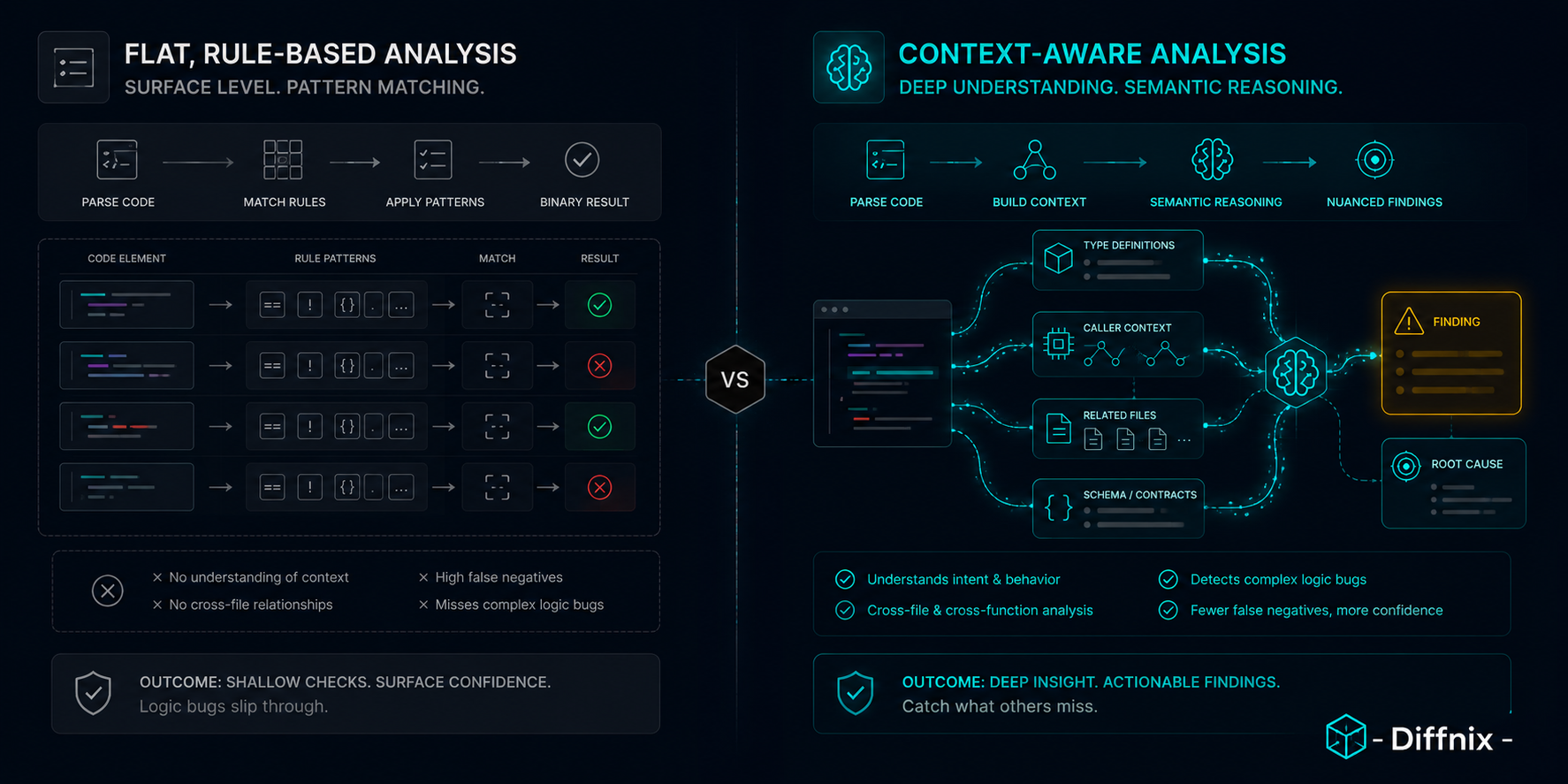
A linter knows what code looks like. It does not know what code does. A null check pattern looks identical regardless of whether it guards the right variable. An error handling pattern looks correct regardless of whether it catches the right exception type. Rules verify structure. They cannot verify semantics.
Limit 2: Rules are context-free by design.
Each rule evaluates a code construct in isolation. A null safety rule does not know what values the callers of this function actually pass. A security rule does not know whether user input reaches this function through a validated path or an unvalidated one. Rules that would require reasoning about calling context are not rules — they are static analysis with data flow awareness, which is already a different category of tool.
Limit 3: Rules describe known mistakes, not all mistakes.
The ESLint rule set represents decades of collective JavaScript knowledge about common mistakes. It is genuinely excellent. But your codebase has application-specific correctness requirements that no general rule set can encode. The relationship between your webhook parser and your status code handling is specific to your application. No third-party rule describes it.
This is why every rule-based tool, no matter how well configured, has a floor of coverage it cannot pass. The bugs below that floor are not the ones tools can write rules for. They are the ones that require understanding what the code is supposed to do.
📌 Insight: Before deciding to invest in more lint rules or a different category of tool, categorize your last five production bugs. Were they pattern violations (wrong construct used) or logic violations (right construct, wrong application)? Pattern violations are addressable with rules. Logic violations are not.
Where SonarQube Sits in the Stack
SonarQube occupies useful middle ground. It goes beyond pure AST matching: it tracks complexity metrics, maintains a project quality history, and does some data flow analysis within functions to detect potential null dereferences.
That data flow analysis gives it limited context-sensitivity that pure AST linters lack. SonarQube can track that a value assigned as null in one branch reaches a dereference in another branch within the same function. That is real value, and it catches a meaningful category of bugs.
But SonarQube is still fundamentally a rule-based system with a larger rule set and intra-function data flow tracking. It does not fetch external type definitions from other modules. It does not reason about calling context from separate files. It does not understand the intent of a change based on a PR description.
The limits are different from ESLint's limits. The category is the same: a system that finds what its rules and data flow patterns describe, and misses everything that requires cross-module context or intent reasoning.
✅ Best Practice: Keep SonarQube for what it does well — complexity tracking, vulnerability pattern matching, and technical debt history. Add AI semantic review for the correctness and logic layer that SonarQube's data flow analysis cannot reach. They are complementary, not redundant.
What Semantic AI Analysis Does Differently
Semantic AI analysis does not check patterns. It reasons about code.
The difference sounds abstract, so here is what it means for the loose equality example from the introduction.
When a semantic AI reviewer analyzes the response.statusCode == 200 comparison, it does not check whether == is present. It fetches the definition of the response type from the codebase, identifies how statusCode is typed in the response schema, checks whether any callers pass responses from a query-string parser (which coerces numeric fields to strings), and reasons about whether the comparison is safe given the actual runtime type.
# The diff that was submitted for review
- if (response.statusCode === 200 && response.data) {
+ if (response.statusCode == 200 && response.data) {
    return processWebhookPayload(response.data)
}
ESLint with eqeqeq: ["warn", "smart"] on this diff: no warning. The smart mode permits comparisons against numeric literals.
A semantic reviewer with context enrichment: "The statusCode field is typed as string | number in the WebhookResponse interface (types/webhook.d.ts, line 14). Loose equality is safe when statusCode is a number, but the webhook handler in handlers/external.ts also processes form-POST requests where statusCode arrives as a string. processWebhookPayload on line 84 of webhooks/processor.ts expects a validated integer-range status code. Recommend strict equality here to prevent the string coercion path."
That finding required: fetching the type definition file, identifying the form-POST handler and its input format, and tracing the call to processWebhookPayload to confirm the downstream expectation. Three pieces of context that were not in the diff.
This is the behavior that the technical breakdown of how PRInspector processes diffs and builds context describes in full detail.
Real-World Use Case: The Webhook Status Code Bug
A backend team maintained a TypeScript codebase with strict mode enabled. Their linting configuration included eqeqeq: ["error", "always"] — the strictest ESLint equality setting. SonarQube ran with the full security ruleset. The CI pipeline had 94% test coverage.
During a refactor to unify status code handling across multiple webhook integrations, a developer changed one strict equality check to loose equality to handle cases where some vendors sent numeric status codes and some sent strings. The intent was reasonable. The implementation had an edge case.
# payments/webhook_handler.ts

- if (response.statusCode === 200 && response.data) {
+ if (response.statusCode == 200 && response.data) {
    return processWebhookPayload(response.data)
}
TypeScript compiled without error. ESLint passed after the developer added // eslint-disable-next-line eqeqeq with a comment explaining the intentional loose comparison. SonarQube passed. The test suite passed because tests mocked status codes as numbers, not as strings.
Three weeks later: a third-party vendor migrated their webhook format and started sending {"statusCode": "200", "data": null}. The condition evaluated to true. response.data was null. The null was truthy through the loose comparison chain. processWebhookPayload(null) ran and produced silent data corruption — no exception, no error log, just incorrect records.
The semantic AI reviewer flagged the change specifically because it fetched the WebhookResponse interface (typed statusCode: string | number) and identified that processWebhookPayload was documented to require a non-null payload with a valid event structure. The eslint-disable comment did not suppress the AI finding, because the AI was not checking whether the equality pattern matched a rule. It was checking whether the logic was correct for the actual types in the codebase.
Root cause investigation after the incident: six engineer-days. Fix implementation: two hours. A semantic review finding at PR stage: two minutes to read and verify.
Advanced Tips for Tech Leads Evaluating the Quality Stack
Audit recent production bugs before choosing a tool
Before adding any new layer to your quality stack, run a 30-minute audit of your last five production bugs that reached users. For each one: would a linter have caught it? Would data flow static analysis have caught it? Would semantic AI review with calling context have caught it?
Most teams find the distribution is roughly: 20% addressable by better linting, 30% addressable by better static analysis, and 50% requiring context that neither tool category can access. That tells you where your investment will have the highest return.
Do not benchmark AI review against trivial examples
The natural instinct when evaluating a new tool is to test it with obvious examples. AI review catches obvious bugs. So does ESLint. The right benchmark is a PR with a subtle logic error that required knowing your type definitions and the calling context to find. That is the category of finding with real value, and it is the one that differentiates tools in this category.
Treat eslint-disable comments as signals for AI review attention
In every codebase, there are eslint-disable comments where a developer intentionally suppressed a lint warning because the rule was too aggressive for the specific case. Those are exactly the places where semantic review adds the most value — a human made a judgment call about a rule, and a reasoning system is more likely to catch an error in that judgment than another pattern-matching rule.
At Diffnix, we observed that a disproportionate share of logic bugs in production were in code that had lint disable comments nearby. Not because the comments caused bugs — because they marked the places where developers made intentional decisions that required contextual reasoning to verify.
⚠️ Warning: When an AI review finding conflicts with a passing lint check — for example, AI flags an equality comparison that ESLint permitted — the AI finding deserves investigation even if lint says the code is fine. Rules are written for the general case. Semantic analysis is applied to your specific case with your specific types. The specificity is where the value lives.
Conclusion
Lint passing is a necessary baseline. It is not a correctness guarantee. The category of bugs that survive lint are not going to be caught by more lint rules, because they require reasoning about runtime behavior, calling context, and type relationships that rule-based tools are architecturally unable to access.
Linters check whether code looks right. Semantic AI analysis checks whether code works right given its context. Both matter. Neither replaces the other. And understanding which layer is producing bugs in your specific codebase tells you exactly where to invest.
We built Diffnix because we kept seeing teams conclude that "AI review doesn't work" after evaluating tools that sent diffs to a generic LLM endpoint. That category of tool does not work well. Semantic analysis grounded in actual codebase context does.
Diffnix is a private, AI-powered code intelligence platform that understands your code — not just scans it.
For the full picture of where AI review sits alongside linting and static analysis, the complete guide to AI code review in 2026 covers the full stack. And for the specific category of bugs that semantic analysis catches — the ones that look fine in the diff but fail in context — why most code reviews miss logic bugs goes deep on the mechanism.
Compare Diffnix against your current analysis stack.