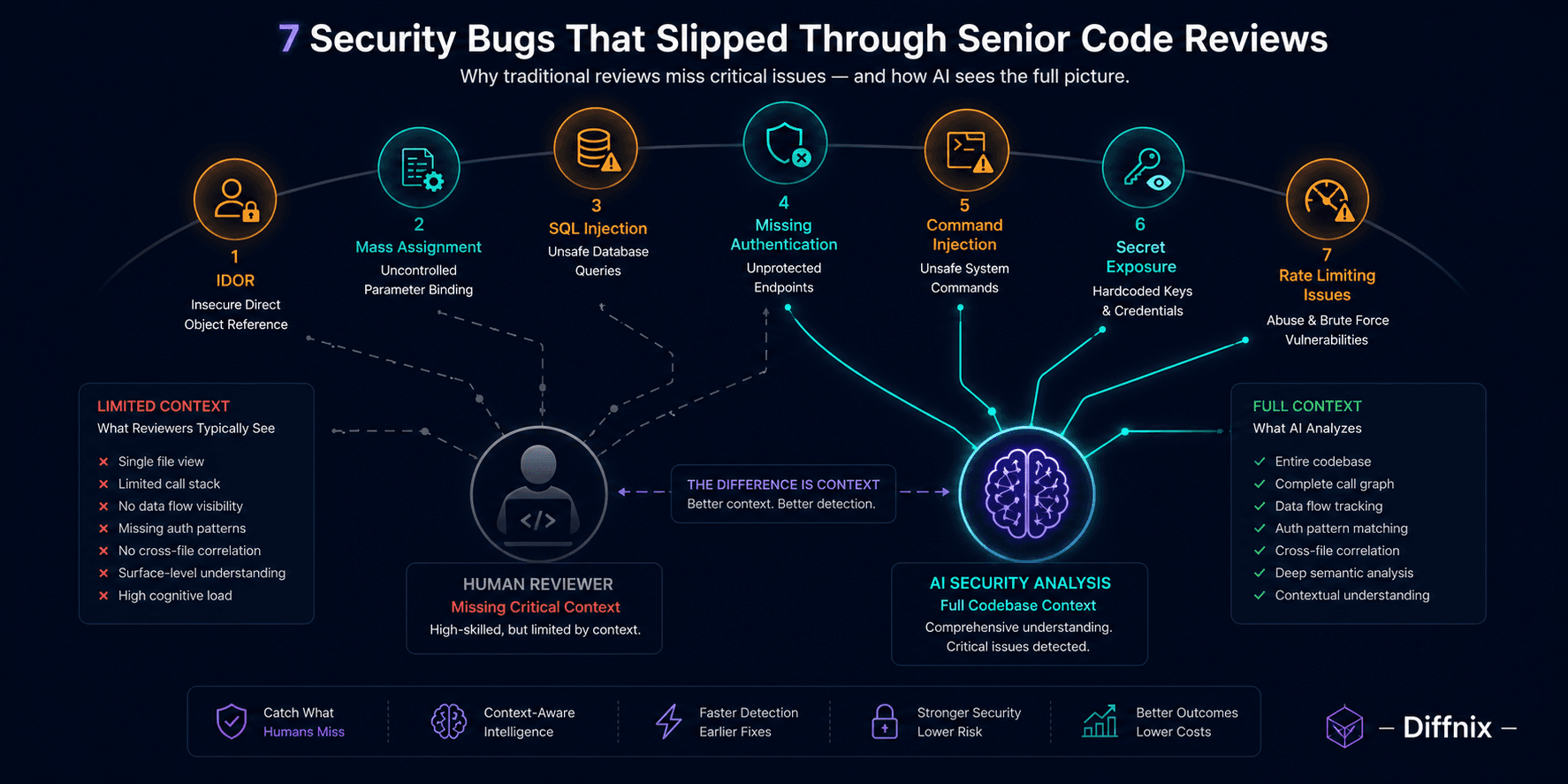
7 Security Bugs That Slipped Through Senior Code Reviews (And How AI Caught Them)
These are not examples of careless review. Every bug in this post was approved by a senior engineer who knew their codebase well. They slipped through because finding them required cross-file context that was not in the diff. This post shows each bug, explains exactly why reviewers missed it, and shows what AI semantic analysis saw that the reviewer could not.

Introduction
There is a tempting explanation for security bugs that reach production: the reviewer was not paying attention. It is comforting because it implies a solution — more attention, better reviewers, slower review.
It is also wrong. The security bugs that cause the most significant incidents are almost never obvious in the diff. They look like legitimate code. They pass SAST. They get approved by engineers who are paying full attention and doing their jobs correctly.
The structural reason: catching these bugs requires knowing something about the codebase that is not in the diff. The authorization model. The ORM's parameter handling. The logging configuration. The background job's authentication context. That information lives in other files, and reviewers even excellent ones are reviewing a diff, not the full codebase.
This post covers seven categories of security bugs that consistently pass senior review. For each one: what the code looks like, why reviewers miss it, and what AI semantic analysis sees that the reviewer could not.
At Diffnix, we observed every category below appearing in real PR reviews across teams that had strong security cultures and experienced engineers. These are not edge cases.
Bug 1: Insecure Direct Object Reference (IDOR)
What it looks like:
# New API endpoint — looks clean, properly authenticated
@app.route('/api/orders/<order_id>')
@login_required
def get_order(order_id):
    order = Order.query.get_or_404(order_id)
    return jsonify(order.to_dict())
Why reviewers miss it: The code looks correct. Authentication is present. The query is parameterized. There is no SQL injection. A reviewer scanning a 150-line PR with 8 changed files sees a standard REST endpoint with proper auth and moves on.
What is actually wrong: No ownership check. Any authenticated user can retrieve any order by changing the order_id URL parameter. The Order model has a customer_id field, but the endpoint never verifies that current_user.id matches order.customer_id.
What AI sees: Context enrichment fetches the Order model definition and finds customer_id: int, ForeignKey('customers.id'). It also checks similar endpoints in the codebase and finds they all include if order.customer_id != current_user.id: abort(403). The new endpoint is missing the pattern that every comparable endpoint uses. Finding: IDOR, critical severity.
The fix:
@app.route('/api/orders/<order_id>')
@login_required
def get_order(order_id):
    order = Order.query.get_or_404(order_id)
    if order.customer_id != current_user.id:
        abort(403)
    return jsonify(order.to_dict())
Bug 2: Mass Assignment Vulnerability
What it looks like:
# Rails controller — concise, idiomatic Ruby
class UsersController < ApplicationController
  def update
    if @user.update(params[:user])
      redirect_to @user, notice: "Profile updated."
    else
      render :edit
    end
  end
end
Why reviewers miss it: This is standard Rails controller code. It is the pattern that Rails tutorials teach. A reviewer who knows Rails looks at this and sees correct, idiomatic implementation. The @user.update(params[:user]) line looks right.
What is actually wrong: params[:user] is not filtered. An attacker can submit a request with user[role]=admin or user[is_staff]=true and update any attribute on the User model, including privileged fields that should never be user-editable. Rails introduced strong_parameters to fix this specific issue, requiring explicit permit() calls. This code bypasses that protection entirely.
What AI sees: Context enrichment fetches the User model and finds role: string, admin: boolean, subscription_tier: string in the attributes list. It identifies that no params.require(:user).permit(...) call is present in the controller. It also checks other controllers in the codebase and finds they all use strong_parameters. Finding: mass assignment vulnerability allowing privilege escalation.
The fix:
def update
  if @user.update(user_params)
    redirect_to @user, notice: "Profile updated."
  else
    render :edit
  end
end

private

def user_params
  params.require(:user).permit(:name, :email, :bio, :avatar_url)
end
Bug 3: SQL Injection via String Concatenation in Search
What it looks like:
# Search function added for filtering users
def search_users(query_string: str, org_id: int) -> list[User]:
    sql = f"""
        SELECT * FROM users
        WHERE organization_id = {org_id}
        AND (name LIKE '%{query_string}%' OR email LIKE '%{query_string}%')
    """
    return db.session.execute(sql).fetchall()
Why reviewers miss it: The function looks like a straightforward search implementation. The org_id is typed as int, so it looks safe. The search string is what a user types in a search box — seems harmless. The f-string format is commonly used for SQL in Python codebases that predate ORM adoption. A reviewer under time pressure sees a plausible search function.
What is actually wrong: query_string is directly interpolated into the SQL statement. A user who types %'; DROP TABLE users; -- in the search box completes the LIKE clause and then executes arbitrary SQL. The org_id integer type protection does not help because query_string is a string with no parameterization.
What AI sees: The function uses f-string interpolation to build an SQL query with a user-controlled string. The query_string parameter traces back to a request handler that reads from request.args.get('q') — direct user input. SAST may catch this if the data flow tracking extends across files. Frequently it does not. AI reasoning identifies the combination: user-controlled string, direct SQL interpolation, no sanitization.
The fix:
def search_users(query_string: str, org_id: int) -> list[User]:
    return db.session.execute(
        text("""
            SELECT * FROM users
            WHERE organization_id = :org_id
            AND (name LIKE :search OR email LIKE :search)
        """),
        {"org_id": org_id, "search": f"%{query_string}%"}
    ).fetchall()
📌 Insight: SQL injection via string concatenation appears most often in codebases that mix ORM and raw SQL — typically search functions, complex aggregations, or reporting queries where the ORM felt insufficient. These are exactly the places SAST data flow analysis fails to trace across the file boundary.
Bug 4: Missing Authentication on Internal Endpoint
What it looks like:
# Internal utility endpoint for operations team
@app.route('/internal/admin/reset-password', methods=['POST'])
def reset_user_password():
    user_id = request.json.get('user_id')
    user = User.query.get_or_404(user_id)
    new_password = generate_secure_password()
    user.set_password(new_password)
    db.session.commit()
    return jsonify({'new_password': new_password, 'user_id': user_id})
Why reviewers miss it: The /internal/ prefix implies this is a protected internal route. Reviewers assume that "internal" means there is network-level protection — a firewall rule, an IP whitelist, a VPN requirement. The code itself looks like standard operational tooling.
What is actually wrong: The route has no authentication decorator. The /internal/ prefix is a URL naming convention, not a security control. If the application is publicly accessible, this endpoint is publicly accessible. Anyone who discovers it can reset any user's password and retrieve the new plaintext password in the response.
What AI sees: No authentication decorator present on the route. Context enrichment checks the other /internal/ routes in the codebase and finds some have @require_internal_token and some do not. It also checks the application configuration for network-level protection documentation and finds none. Finding: unauthenticated privileged operation — critical severity.
The fix:
@app.route('/internal/admin/reset-password', methods=['POST'])
@require_internal_token   # validates a shared secret in Authorization header
def reset_user_password():
    user_id = request.json.get('user_id')
    user = User.query.get_or_404(user_id)
    new_password = generate_secure_password()
    user.set_password(new_password)
    db.session.commit()
    # Do not return plaintext password in response
    send_password_reset_email(user)
    return jsonify({'status': 'reset_sent', 'user_id': user_id})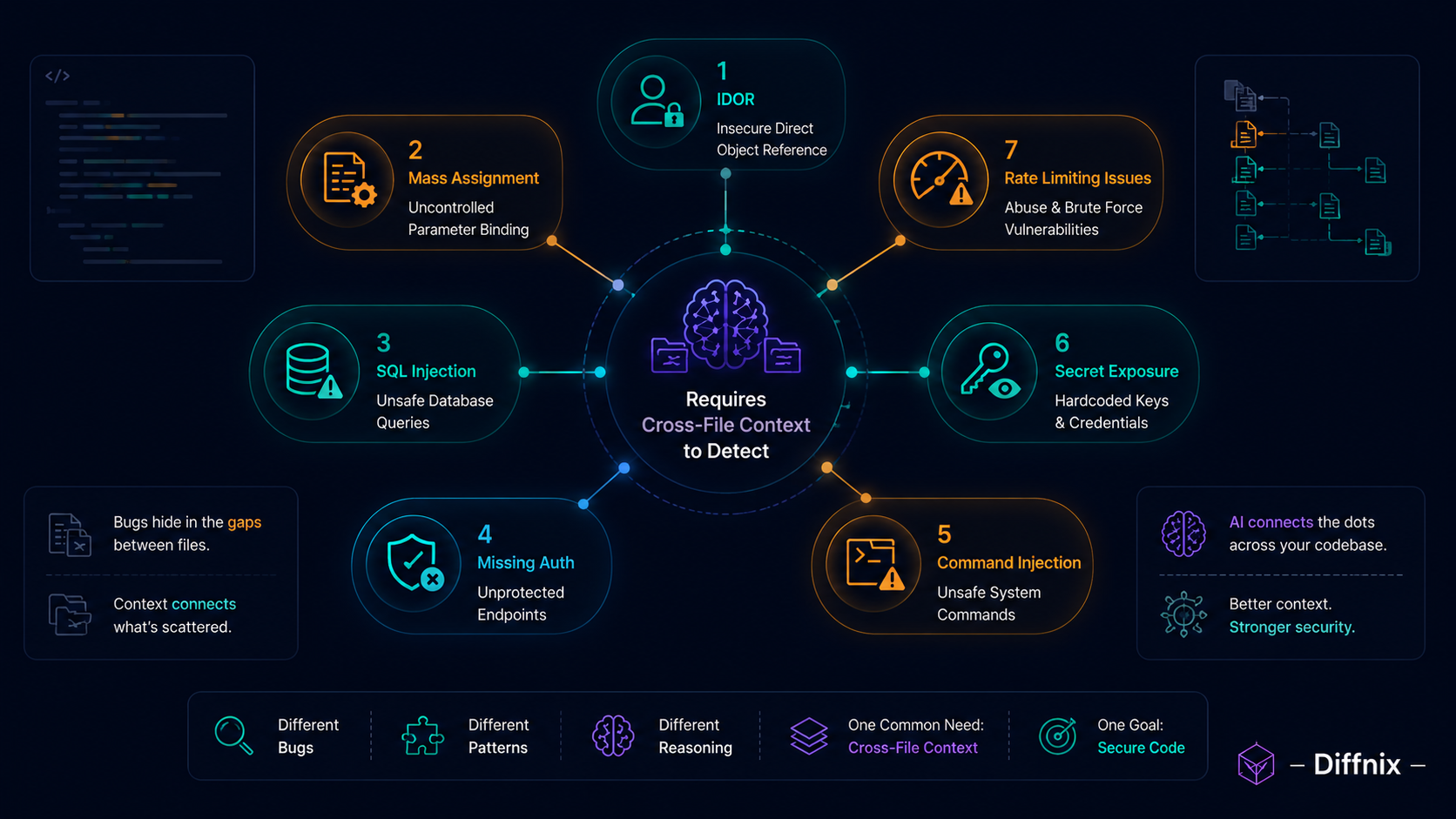
Bug 5: Command Injection via Shell Execution
What it looks like:
# File processing utility — converts uploaded files
def convert_document(filename: str, output_format: str) -> str:
    output_file = filename.replace('.docx', f'.{output_format}')
    result = subprocess.run(
        f"libreoffice --convert-to {output_format} {filename}",
        shell=True,
        capture_output=True,
        cwd='/tmp/uploads'
    )
    return output_file
Why reviewers miss it: The code uses libreoffice for document conversion, which is a standard approach. The shell=True parameter might raise an eyebrow, but it is commonly used when the command needs shell features. The function looks like practical file processing utility code.
What is actually wrong: Both filename and output_format are interpolated directly into the shell command. If either value comes from user input, this is a command injection vulnerability. A filename of malicious.docx; rm -rf /tmp/uploads executes the deletion as a separate shell command. shell=True is the mechanism that makes this possible — it tells Python to pass the string to /bin/sh -c, which interprets shell metacharacters.
What AI sees: Context enrichment traces filename back to its origin — a file upload handler that uses the original filename from the multipart form data without sanitization. output_format comes from a request parameter. Both are user-controlled strings. shell=True with user-controlled input is a command injection path. Finding: command injection via shell execution.
The fix:
import shlex

ALLOWED_FORMATS = {'pdf', 'txt', 'html', 'odt'}

def convert_document(filename: str, output_format: str) -> str:
    if output_format not in ALLOWED_FORMATS:
        raise ValueError(f"Unsupported format: {output_format}")
    safe_filename = Path(filename).name  # strip any path traversal
    output_file = safe_filename.replace('.docx', f'.{output_format}')
    result = subprocess.run(
        ['libreoffice', '--convert-to', output_format, safe_filename],
        capture_output=True,
        cwd='/tmp/uploads'
        # shell=False is the default — no shell interpolation
    )
    return output_file
Bug 6: Secret Exposure via Logging
What it looks like:
# Authentication service — added debug logging for troubleshooting
def authenticate_api_key(api_key: str, client_id: str) -> Optional[ApiClient]:
    logger.debug(f"Auth attempt: client={client_id}, key={api_key[:8]}...")
    client = ApiClient.query.filter_by(
        client_id=client_id,
        api_key_hash=hash_key(api_key)
    ).first()
    if not client:
        logger.warning(f"Failed auth: client={client_id}, key={api_key}")
        return None
    return client
Why reviewers miss it: The first log line looks careful — it only logs the first 8 characters of the key. This is a common and responsible debugging pattern. The second log line, in the failure path, is easy to overlook during a review of a 12-line function.
What is actually wrong: The failure path logs the full api_key value. If authentication fails — which happens regularly with expired keys, rotated keys, and brute-force attempts — the full plaintext key is written to the application logs. Log storage typically has broader access than the secret vault. Log shipping to external services like Datadog, Splunk, or CloudWatch expands the exposure surface further. A key that appears in logs is a compromised key.
What AI sees: The logger.warning call in the failure branch includes api_key as a full string, not a truncated or hashed version. Context enrichment identifies that the application ships logs to an external logging service. The api_key parameter is the authentication credential being validated. Logging the full value in the failure path exposes the key in logs. Finding: secret exposure via logging, high severity.
The fix:
def authenticate_api_key(api_key: str, client_id: str) -> Optional[ApiClient]:
    logger.debug(f"Auth attempt: client={client_id}, key_prefix={api_key[:8]}")
    client = ApiClient.query.filter_by(
        client_id=client_id,
        api_key_hash=hash_key(api_key)
    ).first()
    if not client:
        # Log enough to diagnose without exposing the credential
        logger.warning(f"Failed auth: client={client_id}, key_prefix={api_key[:8]}")
        return None
    return client
Bug 7: Missing Rate Limiting on Authentication Endpoint
What it looks like:
# Login endpoint — standard implementation
@app.route('/api/auth/login', methods=['POST'])
def login():
    email = request.json.get('email')
    password = request.json.get('password')
    user = User.query.filter_by(email=email).first()
    if user and user.check_password(password):
        return jsonify({'token': generate_token(user), 'expires_in': 3600})
    return jsonify({'error': 'Invalid credentials'}), 401
Why reviewers miss it: This is a standard, clean login endpoint. It uses check_password which implies proper hashing. It returns a JWT with an expiry. The structure is textbook. Missing rate limiting is an absence, not a presence — there is nothing wrong in the code that is there. Reviewers check what is present. They rarely enumerate what is absent.
What is actually wrong: An attacker can submit unlimited login attempts against this endpoint. With no rate limiting, brute-forcing a password hash is limited only by network bandwidth and the server's processing capacity. For accounts without multi-factor authentication, this is a credential stuffing and brute-force vector.
What AI sees: Context enrichment checks whether any rate limiting middleware is applied to this route — neither a decorator nor a global rate limiting configuration covers it. It checks other authentication endpoints in the codebase and finds /api/auth/reset-password has a rate limiter but /api/auth/login does not. It also checks the application configuration and finds no WAF or infrastructure-level rate limiting documented. Finding: missing rate limiting on authentication endpoint.
The fix:
from flask_limiter import Limiter

limiter = Limiter(app, key_func=get_remote_address)

@app.route('/api/auth/login', methods=['POST'])
@limiter.limit("10 per minute")   # adjust based on expected legitimate traffic
def login():
    email = request.json.get('email')
    password = request.json.get('password')
    user = User.query.filter_by(email=email).first()
    if user and user.check_password(password):
        return jsonify({'token': generate_token(user), 'expires_in': 3600})
    return jsonify({'error': 'Invalid credentials'}), 401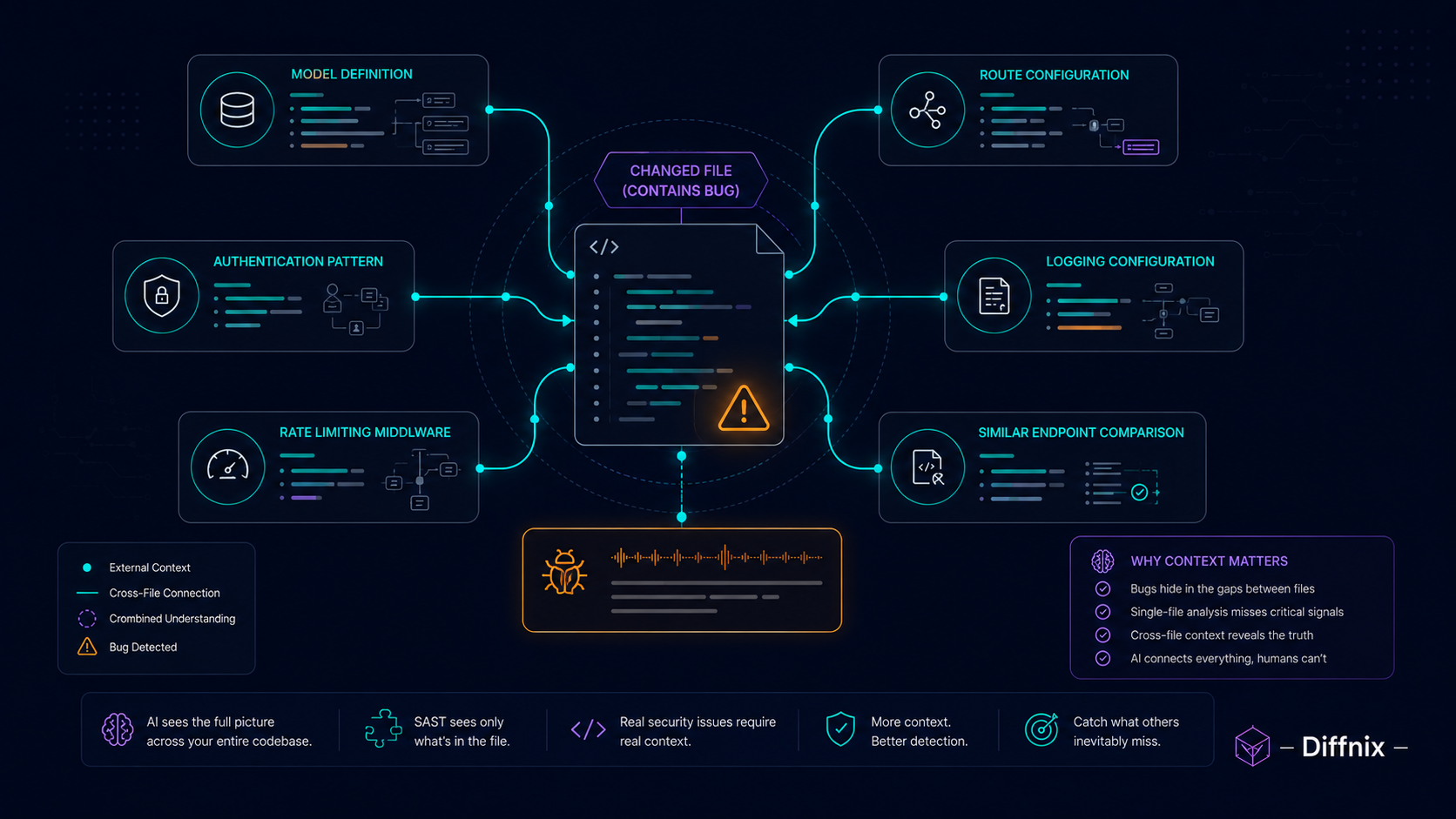
Why Senior Reviewers Miss All Seven
The unifying pattern across all seven bugs: each one requires knowing something that is not in the diff.
The IDOR requires knowing the authorization model. The mass assignment requires knowing which model attributes are privileged. The SQL injection requires tracing the data flow from user input to the SQL string across file boundaries. The missing authentication requires knowing the network topology or the existing auth patterns in other routes. The command injection requires tracing the filename parameter back to its origin. The secret logging requires knowing that the logging service ships to an external system. The rate limiting requires knowing that no global rate limiter covers this route.
Senior engineers know their codebases. They still miss these bugs because they review diffs, and diffs do not contain the context needed to see them.
AI review does not know your codebase as deeply as your senior engineers do. But it fetches the specific context needed for each finding rather than relying on memory. That is what makes the finding rate different.
For the full picture of private AI review that keeps security findings confidential, the private AI code review enterprise guide covers the architectural requirements. And for the specific shift-left security workflow that catches these at PR stage, shift-left security at the PR stage goes deep on the mechanism.
✅ Best Practice: After seeing a security finding category appear in a PR, check your existing codebase for the same pattern. AI review finds bugs in new code as it arrives. Your existing codebase may contain the same vulnerability class from before AI review was deployed. A targeted search for IDOR patterns, unguarded params[:user] calls, or shell=True in subprocess calls is worth running once across the whole codebase.
Conclusion
Security bugs survive senior code review for a structural reason: finding them requires information that is not in the diff. The reviewer knows a lot about the codebase. They do not have it all in front of them at review time.
AI semantic analysis with context enrichment changes what is available at review time. It fetches the model definition. It checks the authorization pattern from similar endpoints. It traces the data flow from user input to the SQL statement. It does not replace reviewer expertise. It gives the reviewer the context they needed and did not have.
Diffnix is a private, AI-powered code intelligence platform that understands your code — not just scans it. Every PR gets the same security analysis, with the same context enrichment, regardless of how many other PRs the reviewer has already processed today.
See how Diffnix flags these categories in your actual PRs.